
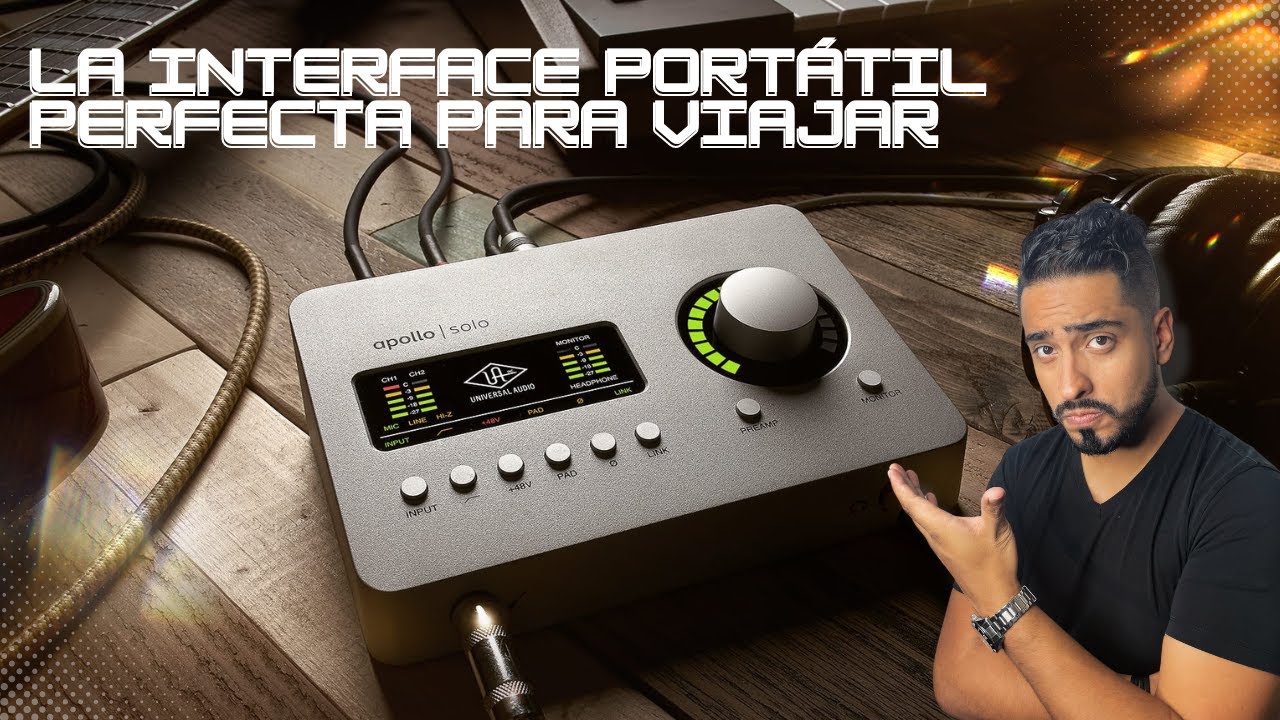
¿Cuál es el mejor Universal Audio Apollo Solo según sus características?
Los datos están comprobados en octubre de 2026.
La respuesta corta: qué versión elegir según tu equipo
Para un portátil Mac con Thunderbolt 3, elige la Apollo Solo Heritage Edition. Para Windows sin Thunderbolt, elige la Apollo Solo USB Heritage Edition. Si necesitas durante la mezcla toda la biblioteca de plugins UAD-2, ninguna de las dos versiones basta por sí sola: su DSP SOLO Core no ejecuta los pluginsnative en tiempo real.
La edición Thunderbolt usa un puerto Thunderbolt 3, mientras que la USB requiere conexión USB-C y alimentación externa. La Apollo Solo Thunderbolt puede funcionar con Mac y con Windows compatibles, siempre que el equipo y los controladores meetan los requisitos publicados por Universal Audio. La USB está dirigida a Windows y tampoco aporta una conexión Thunderbolt.
La decisión principal no depende de la cantidad de entradas, porque ambas ofrecen las mismas dos entradas combo y una entrada Hi-Z para instrumentos. Depende de la conexión disponible y del sistema que utiliza la estación de trabajo.
Si ya tienes un Mac con Thunderbolt 3 o un Windows con Thunderbolt 3, la Heritage Thunderbolt evita añadir una interfaz USB y una fuente de alimentación aparte. Si utilizas Windows sobre un portátil sin Thunderbolt, la USB resulta más coherente, aunque no sustituye a una interfaz USB-C alimentada de forma externa.
Antes de comprar, comprueba qué puerto utiliza realmente tu equipo. Un puerto USB-C que solo admite datos no equivale a Thunderbolt 3, y un adaptador USB no convierte un Thunderbolt antiguo en una conexión compatible.
La elección práctica es sencilla: Thunderbolt 3 para Mac o Windows compatible; USB para Windows sin Thunderbolt. La limitaciónDSP afecta por igual a las dos.
Las dos versiones frente a frente
| Característica | Apollo Solo Heritage Edition Thunderbolt | Apollo Solo USB Heritage Edition |
|---|---|---|
| Conexión | Thunderbolt 3 | USB-C con alimentación externa |
| Compatibilidad de sistema | Mac y Windows compatibles | Windows |
| Alimentación | desde el equipo mediante Thunderbolt | fuente de alimentación externa |
| Entradas de audio | 2 combo + 1 Hi-Z | 2 combo + 1 Hi-Z |
| Salidas de audio | 4 | 4 |
| Resolución máxima | 24 bits / 192 kHz | 24 bits / 192 kHz |
| Latencia | cercana a cero con el DSP | cercana a cero con el DSP |
| DSP | SOLO Core | SOLO Core |
| Requisitos | puerto Thunderbolt 3 y sistema compatible | Windows, USB-C compatible y fuente de alimentación |
Las dos unidades comparten la arquitectura de la Apollo Solo: preamplificador Unison, cuatro salidas de línea y cuatro controladores de lo que actualizado. Esa parte es igual en ambas ediciones.
Cambian el bus de conexión, la alimentación y el conjunto de sistemas operativos admitidos. La Thunderbolt tiene un ancho de banda nominal de 40 Gbps, aunque el rendimiento de audio real depende también del controlador, del sistema y del software. La conexión USB-C por sí sola no especifica la generación del bus; por eso debe comprobarse que sea compatible con la interfaz.
El formato de audio admitido llega a 24 bits y 192 kHz. La monitorización mediante el DSP ofrece una latencia cercana a cero cuando la implementación de la workstation está configurada para ello. Los plugins compatibles con UAD-2 en tiempo real solo están disponibles si están cargados dentro del DSP SOLO Core.
La principal disadvantage independiente de la conexión es la misma en ambas: SOLO Core no permite cargar toda la colección UAD-2. Si tu proyecto depende de un plugin concreto que no esté emulado por SOLO Core, tendrás que sustituirlo por su equivalente UAD-2 native o por otro plugin.
Thunderbolt 3 frente a USB: la diferencia que decide la compra
Thunderbolt 3 permite conectar la Apollo Solo a un Mac con el puerto correspondiente y a sistemas Windows compatibles. Universal Audio publica requisitos de sistema y controladores actualizados para cada versión admitida. Conviene instalar el controlador indicado antes de mover la interfaz, porque su enumeración y reconocimiento dependen del sistema operativo, no únicamente de la forma del conector.
USB cumple una función distinta: la Apollo Solo USB Heritage Edition está pensada para Windows y usa USB-C. La alimentación externa es obligatoria, de modo que necesitarás una fuente y un cable compatibles con la unidad. Estarequirement puede resultar decisiva si ya dispones de un cargador USB-C de alta potencia adecuado; si no, también debe quedar incluido en la compra.
La ventaja funcional de Thunderbolt 3 es que transporta datos y alimentación en un mismo enlace y permite el funcionamiento con Mac. La ventaja de USB es utilizar un puerto que aparece en muchos equipos Windows, aunque esa apariencia no garantiza compatibilidad: debe verificarse si admite transferencia de datos y si es de la generación prevista por la interfaz.
No compres un adaptador para.save Thunderbolt antiguo. La documentación oficial de Universal Audio sobre Apollo Solo distingue las ediciones Thunderbolt y USB y publica los requisitos de cada variante.
Entradas, salidas y capacidad de las reglas Unison
La Apollo Solo ofrece dos entradas combo, compatibles con tu balanceadas? Balancing: microphones and line inputs, and an additional Hi-Z input for instruments with a high impedance. The preamplifier Unison imitates the behavior and controls of selected hardware preamps. It is hardware processing, so its controls remain available even when using the Apollo’s low-latency monitoring.
The output section provides four line outputs. These can be used for monitors, a stereo pair, and additional destinations depending on the monitoring configuration. The Apollo Solo therefore has enough physical I/O for a compact project: two inputs for microphones or line sources, a separate instrument input, and four outputs for monitoring and routing.
The important limit is not the number of physical inputs. It is the DSP SOLO Core. The Solo DSP includes a subset of UAD plugins emulated for real-time processing. It does not run the complete UAD-2 catalog. A plugin that is not included in SOLO Core must be used in UAD-2 native mode, or replaced.
For example, a session recording vocals with one mono microphone and electric guitar through the Hi-Z input has sufficient connections. If a drummer provides separate outputs for the kick, snare, and overheads, the two combo inputs are insufficient for independent preamp control; you would need a multichannel interface or a converter.
The Unison feature also requires compatible hardware or supported emulations, depending on the plugin. Check the current plugin list before assuming that a specific mic preamp, guitar amp, or channel strip is available on the Solo DSP.
Latencia, frecuencia de muestreo y procesamiento en tiempo real
The Apollo Solo works with audio up to 24-bit / 192 kHz resolution. These figures describe the supported conversion format; they do not mean that every plugin behaves identically at every sample rate.
Its monitoring path through the DSP can offer near-zero latency. The actual round-trip figure visible in the workstation depends on buffer size, operating system, driver, and monitoring mode. For tracking, a practical procedure is to begin with a larger buffer, verify stable recording, and then reduce it in small steps while monitoring the reported latency.
The Solo DSP supports compatible UAD plugins in real time. The host formats involved are VST, Audio Units, and AAX, according to the operating system and DAW being used. The Mac path uses Audio Units; the Windows path uses VST or AAX, depending on the application.
The key distinction is between the plugin running in the Solo DSP and the plugin running natively on the CPU. If the plugin is loaded on the DSP, it can provide low-latency monitoring and process its controls through the hardware. If it is not available on SOLO Core, it must run in UAD-2 native mode, with latency determined by the computer and host buffer.
Near-zero monitoring therefore means low-latency tracking through supported DSP plugins, not zero latency for every third-party plugin or every converter in the chain. The Universal Audio Apollo hardware manual provides the applicable setup details for monitoring and host configuration.
Software, licencia y compatibilidad con tu estación de trabajo
The Solo requires a Universal Audio account and registration to use the Apollo hardware and the UAD-2 plugins included with the unit. The account is linked to the registered device, allowing the available licenses and plugin permissions to be managed.
UAD Console is the application used to manage the hardware, assign plugins to the Solo DSP, and configure supported Unison features. LUNA is a separate macOS system for running UAD-2 plugins natively. It is not a plugin host for the Apollo Solo, and it cannot run the Solo’s DSP on a Windows system.
On macOS, LUNA can be used as a host for native UAD-2 processing when the computer and UAD plug-ins support that route. It does not turn the Apollo Solo USB into a Thunderbolt device and does not extend SOLO Core to the complete UAD-2 catalog.
Compatibility must be checked before purchase. For the Thunderbolt edition, verify the macOS or Windows version, the presence of a native Thunderbolt 3 port, and the current Universal Audio driver. For the USB edition, verify the Windows version, the USB-C port and cable, and the supplied power supply.
The official Apollo Solo product page lists the current editions and access requirements. The exact minimum operating-system versions and CPU requirements can change as drivers and software are updated, so use the current manual rather than an older store description.
Qué necesitarás aparte y qué no incluye el equipo
Revisa this list before ordering:
- Thunderbolt edition: a Thunderbolt 3 cable. The Thunderbolt 3 specification from the USB-IF defines the 40 Gbps physical connection used by the interface.
- USB edition: a compatible USB-C cable and the external power supply required by the Apollo Solo USB.
- Headphones: the Apollo Solo has independent headphone output for direct monitoring.
- Microphone or instrument source: the two combo inputs and the Hi-Z input are physical connections, not included microphones or instrument cables.
- Output connections: four line outputs are provided, but cables to monitors, mixers, or converters are separate.
- Plugin entitlement: the included UAD-2 plugins require a UA account and registration. Check the current plugin bundle for the exact Solo package.
- Stand and storage: if the unit will be used away from a desk, check its dimensions and weight against the support and carrying case you plan to use.
- Compatible workstation: confirm the current operating-system, Thunderbolt, USB, and driver requirements.
The hardware does not include a microphone, headphones, studio monitors, XLR or instrument cables, a Thunderbolt cable in every package, or a guaranteed license for the complete UAD-2 catalog. For the USB edition, do not assume that a USB-C charger in your drawer will satisfy the power requirement; use the unit’s specified supply.
For a complete small setup, add headphones, a microphone, XLR and instrument cables, monitor output cables, and the correct power or data cable for the chosen edition.
Errores antes de comprar o actualizar
- Buying by connector shape: USB-C can carry several kinds of connections. Check the full port specification, not the physical shape.
- Using an old Thunderbolt port: the Apollo Solo Thunderbolt requires Thunderbolt 3. An older Thunderbolt generation is not the same interface connection.
- Connecting through an unpowered hub: this can prevent the Apollo from being recognized reliably. Connect directly while troubleshooting.
- Assuming every USB adapter works: data speed, power delivery, and supported operating-system drivers must all match the interface requirements.
- Expecting SOLO Core to run every UAD-2 plugin: only the plugins included in SOLO Core can run on the Solo DSP. Other UAD-2 plugins require native processing.
- Treating LUNA as a cross-platform extension system: LUNA is for macOS and is not the Windows host for the Apollo Solo USB.
- Buying the Thunderbolt edition for a Mac without that port: the correct interface cannot add a Thunderbolt controller through a generic USB-C adapter.
- Ignoring the operating system: check the current Universal Audio compatibility list before installing, because driver support and minimum system versions change.
- Using one cable for everything: Thunderbolt data, USB data, and external power are separate requirements. Verify the cable and supply specified for the exact edition.
The Universal Audio support center is the appropriate place to confirm current drivers and troubleshooting steps for either Apollo Solo edition.
Preguntas frecuentes sobre Apollo Solo Heritage Edition
1. ¿Qué es el Universal Audio Apollo Solo USB?
Es una interfaz de audio USB con dos preamplificadores de micrófono y una entrada para instrumento de alta impedancia. Se conecta por USB a un ordenador y funciona con la serie Apollo Twin, ideal para grabar voz, guitarra o teclado en un proyecto doméstico. Para usarla, instala sus controladores y la aplicación de audio en el ordenador.
2. ¿Qué diferencia hay entre Apollo Solo USB y Apollo Solo Thunderbolt 3?
La versión USB utiliza un puerto USB y ofrece una conexión compatible con_bloc de_ORDER de aproximadamente 24 bits y 192 kHz. La Thunderbolt 3 reduce la latencia, por lo que resulta más conveniente para monitorización y grabación en tiempo real. La elección depende de la velocidad del ordenador y de si necesitas esa latencia inferior.
3. ¿QuéFeatures tiene el Apollo Solo para decide whether comprar?
El Apollo Solo es una interfaz de dos entradas con preamplificadores de micrófono, phantom power y conversión de audio de alta resolución. La reviews the “Apollo Solo review” should mention that the USB model works as a simple desktop interface, while the Thunderbolt 3 version is aimed at musicians who need lower monitoring latency. Both require compatible software and a suitable computer connection.
4. ¿Cómo se instalan los controladores del Apollo Solo?
Descarga el paquete de controladores correspondiente a tu sistema desde el sitio de Universal Audio, instálalo y reinicia el ordenador. Después abre la aplicación de Universal Audio para configurar la interfaz, comprobar la conexión y seleccionar la frecuencia de muestreo. Si el equipo no reconoce el dispositivo, prueba otro puerto USB y revisa que los controles estén instalados.
5. ¿Dónde se descarga el controlador del Apollo Solo?
El controlador oficial se descarga desde la página de soporte de Universal Audio, dentro del área de Apollo Solo USB o Apollo Solo Thunderbolt 3. Selecciona el sistema operativo y la versión de hardware; no conviene instalar un paquete de otro modelo, porque pueden cambiar los componentes y las funciones. La página indica también los requisitos y la documentación de instalación.
6. ¿En qué se diferencia el Apollo Twin X del Apollo Solo?
El Apollo Twin X es una interfaz modular de la gama Apollo con más canales, preamplificadores y opciones de conexión que el Apollo Solo. Ofrece mayor capacidad para Davis,:bands,:_multitracks y escenarios de producción más exigentes, mientras que el Solo está pensado para un equipo compacto y una o dos fuentes. Para comprobarlo, compara las especificaciones de entradas, salidas, latencia y software compatible.
Fuentes
- VictorymusicalUA Apollo Solo USB Audio Interface for Windows | Victoryconsultado el 29/10/2026
- StraitmusicUniversal Audio Apollo Solo USB Heritage Edition Desktop Interfaceconsultado el 29/10/2026
- PerfectcircuitUniversal Audio Apollo Solo – Heritage Edition | Perfect Circuitconsultado el 29/10/2026
- RetrosonicproaudioUniversal Audio Apollo Solo Heritage Edition (Desktop/Mac/Win/TB3)consultado el 29/10/2026
- SoundonsoundUniversal Audio Apollo Soloconsultado el 29/10/2026